Category: Transcripts

8 posts

Working Around Discontinuous Timecodes

We often hear from users working with video that has a running timecode burned in to the video image. The most common issue is that the on-screen running timecode doesn’t match up with InqScribe’s default [00.00.00:00] starting point. You can easily resolve this by running a timecode adjustment. However, you may also have a gap…

Read more
Standard

Guest Blog: Transcribing Spider Monkeys

Did you know you can use InqScribe to transcribe just about any language? Yes, even the language of spider monkeys. By: Sandra E. Smith Aguilar, PhD student at the Interdisciplinary Research Center for Regional Development (CIIDIR) Campus Oaxaca, of the National Polytechnic Institute (IPN) in Mexico. My research focuses on understanding the relationship between spider…

Read more

Creating a Transcript with InqScribe and Dragon NaturallySpeaking

Update: In addition to using Dragon as described below, you can now use Apple’s Dictation feature with the InqScribe 2.5 Beta. More information here (sorry, macOS only!). — When we’re asked about speech recognition software, it’s often from new users hoping to automate their transcription process. Although InqScribe doesn’t include any speech recognition technology, you can…

Read more

InqScribe Tips: Format Transcripts as Tables

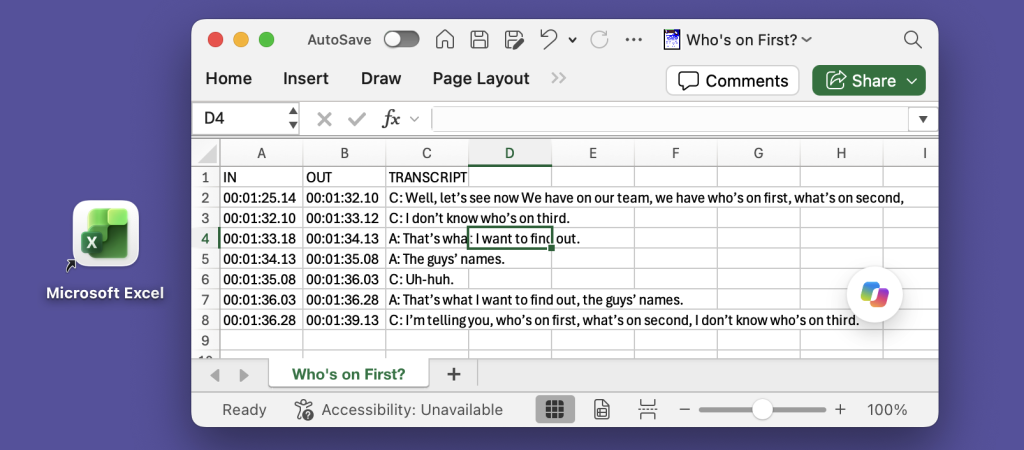
We often get inquiries from our users about how to format text as tables in InqScribe. Because InqScribe’s transcript window is “plain text,” it does not support tables. However, we can suggest these methods for converting InqScribe transcripts into table format. Many of our users use the Tab key to delineate columns and the Return…

Read more

Guest Blog: A Final Cut Pro Workflow for Editing in Another Language

Finding the right workflow for a project can be a challenge, especially when you have multiple languages, multiple tools, and multiple collaborators in the mix.  In our latest guest blog, Chad Braham, an editor and Director of Media Production at WORDonCancer.org describes in very helpful detail how they’ve developed a translation workflow that starts in…

Read more

Taking and Sharing Notes on Video

InqScribe’s free-form text editing is intended to support a wide variety of tasks. So while we often talk of “transcribing” video, in practice oftentimes it’s more efficient to simply take notes. I was reminded of this in recent conversation with one of our customers at a cable tv network: sometimes all you want to do…

Read more

Guest Blog: How Documentary Filmmakers Transcribe and Subtitle With InqScribe

InqScribe has many different kinds of users. But the majority of our users can be categorized into three groups: university researchers, professional transcriptionists, and documentary filmmakers. To highlight how our folks are using the tool, we would like to do an occasional feature where we invite our users to be guest bloggers. Here’s our first…

Read more