 matt
mattFor more than two decades, researchers, filmmakers, journalists, and transcriptionists have relied on InqScribe to take notes, log footage, and create transcripts by hand—quickly and accurately.
With InqScribe 3, we’re keeping everything people already love about InqScribe… and adding something big:
Automatic AI transcription, performed privately on your computer.
So whether you’re discovering InqScribe for the first time or coming from version 2, here’s an introduction to what InqScribe 3 is all about.
The Tools People Have Trusted for Years
Before AI entered the picture, InqScribe built its reputation on one simple idea:
Working with media should feel like working with text.
InqScribe has always been a media-savvy text editor—a place where you could listen, watch, and write at the same time.
You can take free-form notes, manually refine transcripts, add codes or comments, mix notes and transcript in one document, and insert clickable timecodes to jump to precise moments. All in a single window, without juggling apps.
That core workflow is still at the heart of InqScribe 3.
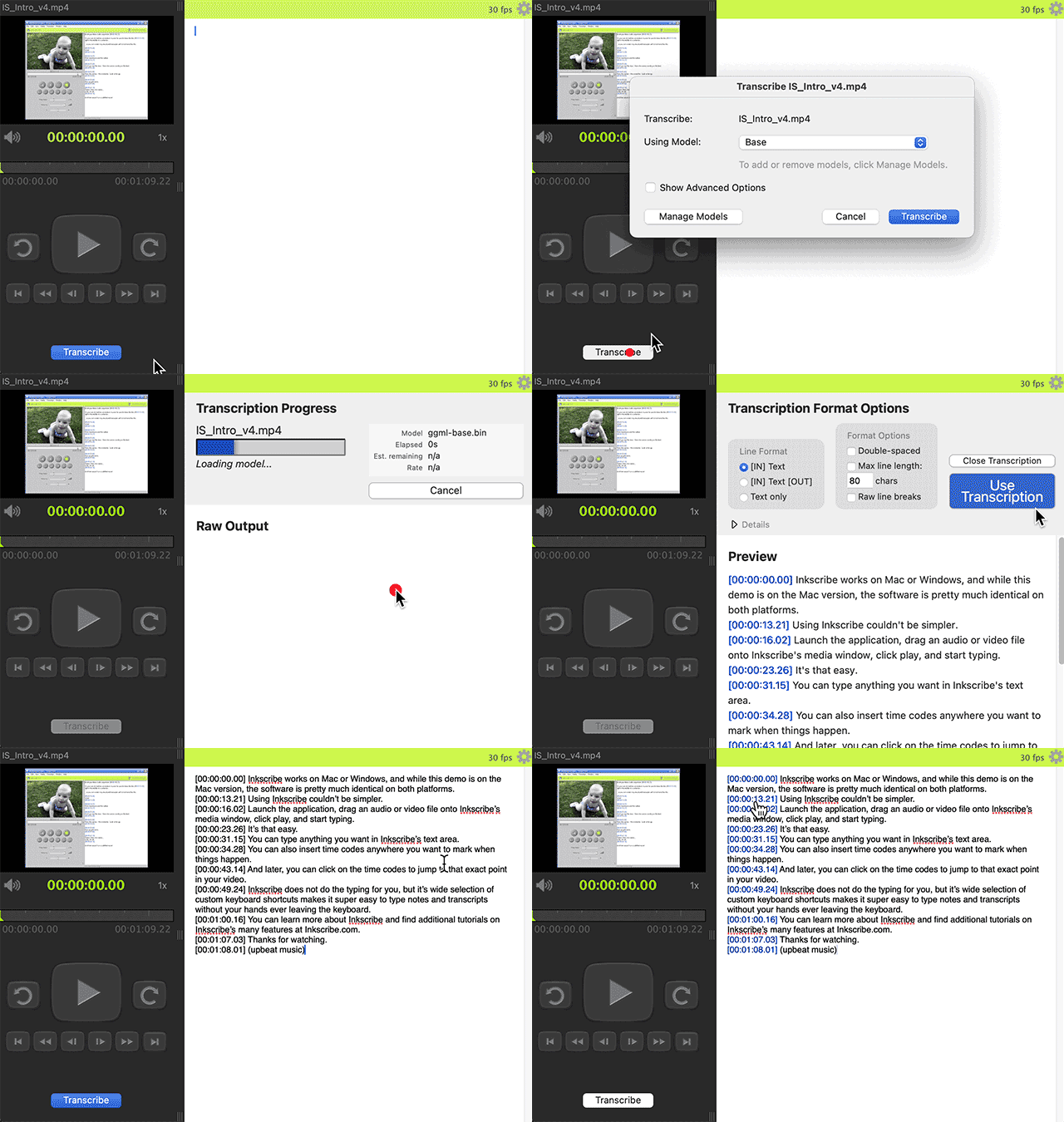
What’s New: Automatic Transcription (Done the Private Way)
The big addition in InqScribe 3 is automatic transcription—powered by AI, but designed with privacy in mind.
Instead of uploading your recordings to a server, InqScribe runs transcription locally on your computer. That means no cloud uploads, no subscriptions, no usage limits, and no training AI models on your data. Your files stay yours. Always.
You can transcribe audio or video. Short clips or full-length films. Interviews, podcasts, and lectures. And you can do it in the field or in the office; no internet connection necessary.
This makes InqScribe especially useful for sensitive interviews, research subject data, legal recordings, confidential journalism, classrooms, and fieldwork.
Manual + Automatic: Work the Way You Want
What makes InqScribe 3 powerful is that it combines automatic transcription with manual editing and annotation tools.
So you’re not locked into “AI output only.” You can clean up transcripts with search-and-replace, add notes or analysis codes, and insert speaker labels with customizable snippets. Then, jump to exact moments with clickable timecodes.
It works whether you auto-transcribe, transcribe by hand, or mix the two.
Export for Whatever Comes Next
When your work is ready to leave InqScribe, it fits into the tools you already use.
Export to a wide range of formats: SRT, WebVTT, SCC, XML, plain text, and more. This allows you to move your InqScribe content seamlessly to Premiere, Final Cut Pro, YouTube, and a host of captioning systems.
Used by Many Kinds of Professionals
InqScribe isn’t just for one field. It is used across a number of fields, in a number of ways.
- Researchers — transcribing interviews and coding qualitative data
- Translators — creating multilingual subtitles
- Filmmakers — logging dailies and building paper edits
- Journalists — reviewing interviews and sharing clips
- Transcriptionists — producing and delivering client transcripts
- Educators & professionals — captioning lectures and documenting testimony
Runs Where You Do
InqScribe 3 runs on most recent macOS and Windows computers. It supports common media and caption formats and doesn’t require special hardware or cloud services.
Flexible Licensing Options
We want InqScribe 3 to be easy to try and easy to afford, whether you’re working solo or as part of an organization. Here’s how licensing works:
- Free 7-day trial – Activate it directly inside the app and explore all the core features.
- Lifetime license — $79 – One-time purchase, free updates for 2 years, no subscription required.
- 10-day license — $10 – Great for short projects or tight deadlines.
- Free Viewer – Open and review files with limitations on transcribing, editing and export.
We also offer discounts for Academic and Non-Profit organizations, as well as special pricing for students.
Whether you need InqScribe for a single project or long-term use, there’s an option that fits.
About Upgrading from InqScribe 2
Since 2005, every major InqScribe update has been free. InqScribe 3 is the first paid upgrade, reflecting a major step forward—especially with the addition of privacy-first automatic transcription.
We want to take care of long-time users, so upgrade discounts are based on when you purchased InqScribe 2:
- Bought in 2025: Free upgrade
- Bought in 2024: 50% off
- Bought before Jan 1, 2024: 20% off
Current license holders can visit our pricing page to get your upgrade discount.
Thanks for being part of the InqScribe community. Your support helps us keep improving InqScribe and continue building tools that respect your workflow and your data.
Try InqScribe 3
InqScribe has been trusted for more than 20 years as a tool for careful, hands-on work with media. With InqScribe 3, it keeps that same foundation—and adds private, automatic transcription for when you want speed without sacrificing control.
If you work with audio or video and care about accuracy, flexibility, and privacy, InqScribe 3 is worth a look.
Download InqScribe 3, try it out, and see how it fits your workflow.

 alex
alex
 christina